
Contacts
Everyone you know, just a few keystrokes away.
Your contacts from iCloud, Google or another CardDAV server, kept in sync both ways with your phone. Mail completes addresses from them and the Launcher finds them. They are kept on your computer, so they open at once and are there offline too.
nightdrive apps install contacts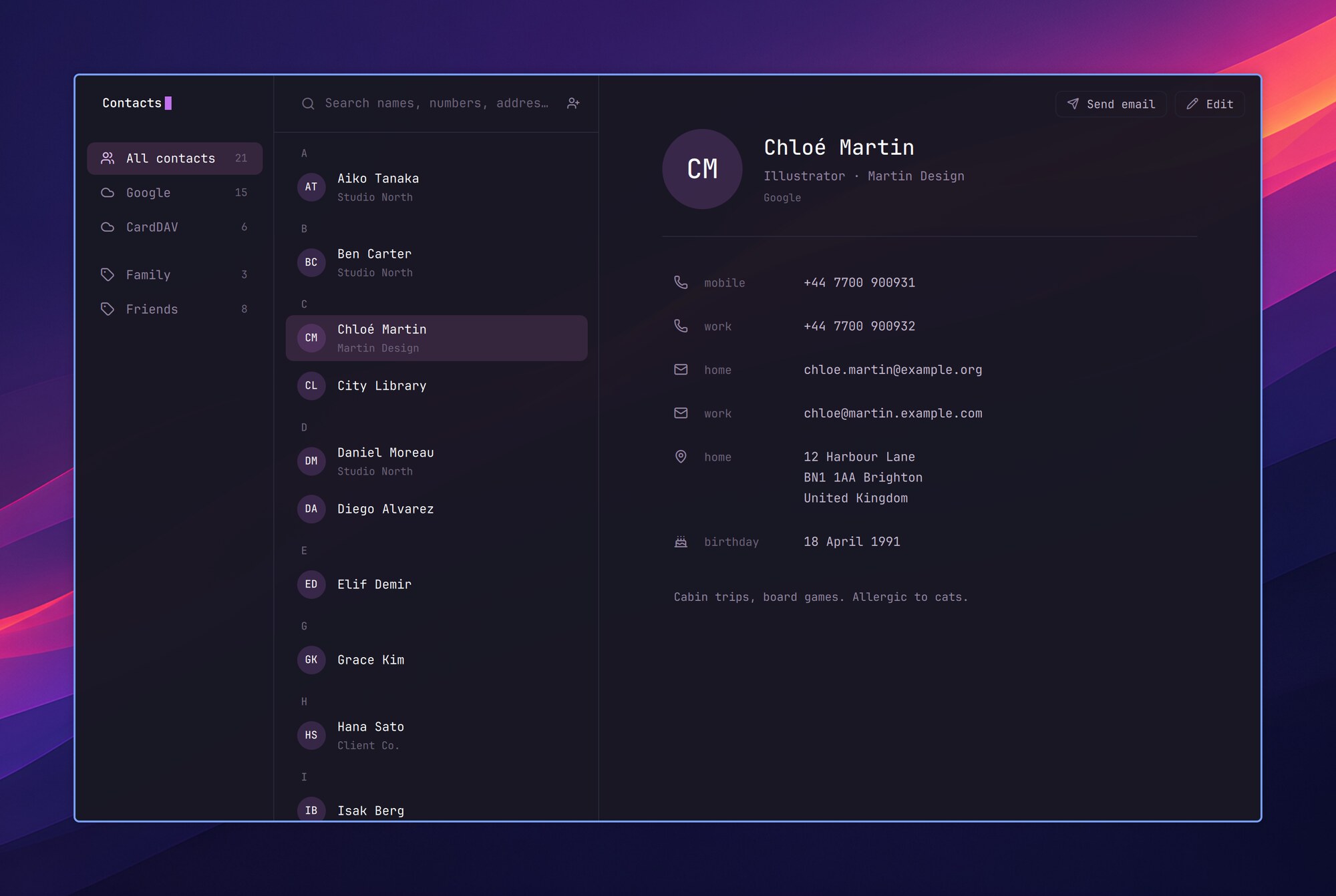
One list, every account
iCloud, Google or any CardDAV server, in sync both ways with your phone. A person in two accounts shows once.
Found everywhere
Mail completes addresses from them, and the Launcher's search finds people by name, company or number.
Edit here, see it there
A change goes to the server at once and on to your phone; a contact changed on both sides is merged field by field.
Set up with Claude
Claude goes through adding an account with you. Your password goes only into the login keyring.
Using it
| ? | Contacts' keys |
| ↑↓ or jk | Move in the list |
| Space⇧Space | Scroll the card |
| / or ⌘F | Search names, companies, addresses and numbers (040 123 finds +358 40 123 too); Esc clears it |
| 1–9 or Ctrl↑Ctrl↓ | A row of the sidebar |
| ⌘B | Hide or show the sidebar |
| Tab⇧Tab | Keys round the sidebar, the list and the card |
| Enter | On the card: write to an address, open a link, copy the rest |
| c | Copy the line |
| w | New email to them |
| ⌘N | New contact |
| ⌘E or e | Edit |
| Delete | Delete, after asking |
| ⌘R | Read the contacts again |
| ⌘, | Settings: the accounts, Sync now (S), Add an account with Claude (A) |
- All contacts shows each person once: their cards in iCloud and Google (the same name, and a number or address in common) are one. Under it each account has its own, with its groups.
- They are kept as vCard files in
~/.local/share/contacts, a folder per account, and vdirsyncer syncs them every 30 minutes. A change you make here goes to the server at once. - iCloud keeps photos apart from the card: the sync fetches them, cut as chosen on the iPhone. Until then the initials show.
Mail and the Launcher
- In Nightdrive Mail, To and Cc complete from your contacts first. Beside a sender's address, a button opens their card, or adds them.
- The Launcher's search (⌘Space) finds people by name, company, email address or number. Enter shows their card in the Launcher: Enter on a number or address copies it, on an email address writes to them (⇧Enter copies). Settings › Launcher › Include contacts leaves them out.
Editing
- The labels (mobile, home, work…) take your own too (Custom…). The birthday is 3.5.1980, or 3.5. without the year. The photo keeps the middle square, 512 pixels at most.
- ⌘S (or ⌘⏎) saves, Esc leaves, asking first if something changed. A new contact goes in the account the sidebar is on; with several accounts, the editor's top line picks another.
- A person whose cards in several accounts show as one is edited a card at a time; Delete deletes them all.
- Saving writes only what you changed: whatever else the card holds (an iPhone's related names, Google's own fields) stays. Offline, the change goes at the next sync.
- If the phone changed the same contact meanwhile, the two are merged a field at a time; a field both changed keeps this computer's.
Setting up an account
Contacts reads your accounts from ~/.config/contacts/accounts.conf, one section each, and signs in with an app password kept in the login keyring. Claude can do these steps with you: Contacts' first start offers it, and so do Welcome to Nightdrive (Launcher › System › Set up Nightdrive) and contacts setup, which open Claude Code in a terminal and go through them a step at a time. Your password goes only into the login keyring, by a command you run yourself. Without Claude, Welcome shows the steps one at a time.
- Contacts comes with Nightdrive. If you removed it, install it again (Launcher › System › Install › Recommended › Contacts, or
nightdrive apps install contacts): it installs vdirsyncer, python3-vobject, libsecret (secret-tool) and ImageMagick (for iCloud's photos).
- Make an app password for Contacts in your account's settings, as mail apps need:
- iCloud: account.apple.com › Sign-In and Security › App-Specific Passwords.
- Google: myaccount.google.com/apppasswords (it needs 2-Step Verification; a Google Workspace account needs its admin to allow app passwords).
- Put the password in the login keyring, so it is never in a file (it asks for the password):
secret-tool store --label="Contacts: you@icloud.com" service contacts.icloud.com user you@icloud.comFor Google, service carddav.googleapis.com. If Nightdrive Mail already reads the same account with an app password, that one does for contacts too: skip this step and use Mail's password-cmd (from ~/.config/nightmail/account.conf) in the next.
- Tell Contacts about the account:
~/.config/contacts/accounts.conf. The name in the section (icloudhere) is the account's folder under~/.local/share/contacts: a-z, 0-9,-and_.
[account icloud]
type = icloud
address = you@icloud.com
password-cmd = secret-tool lookup service contacts.icloud.com user you@icloud.com

[account work]
type = google
address = you@example.com
password-cmd = secret-tool lookup service carddav.googleapis.com user you@example.com
Another CardDAV server (Fastmail, Nextcloud, Runbox…) is type = carddav with its address as url = https://…; address is then the user name you sign in with.
- Fetch the contacts and see how many came:
contacts sync, thencontacts accounts.
- Run
contacts enable(or the plugin's installer again): Contacts joins the apps, and the sync runs every 30 minutes from then on. It skips its round while the login keyring is locked.
Google's CardDAV with an app password works, but Google's own documentation asks for OAuth. If Google ever stops taking it, vdirsyncer's google_contacts with an OAuth client of your own is the way left.
In a terminal
| Command | What it does |
|---|---|
contacts | Opens Contacts, or brings it forward |
contacts search TEXT | Opens Contacts on what a search finds |
contacts show WHO | Opens the card of WHO: an email address, a number, or a card's id |
contacts new [NAME] [EMAIL] | A new contact in the editor, with these filled in |
contacts settings | Opens the settings: the accounts, Sync now, Add an account |
contacts people | Everyone as JSON (names, numbers, email and street addresses), as Mail and the Launcher read them |
contacts setup | Sets up an account with Claude, in a terminal |
contacts sync [NAME…] | Syncs every account's contacts both ways now (or these accounts'), then fetches iCloud's new photos |
contacts accounts | The accounts and how many contacts each has here |
contacts enable, disable | Contacts among the apps and the sync every 30 minutes, on or off (your contacts and accounts stay) |
contacts restart, quit, log | After a change to Contacts, and its QML errors |
contacts vdirsyncer … | vdirsyncer with Contacts' config, for a closer look |