
Your mail, quiet, on your own computer.
A quiet mail client for the keyboard. New mail arrives as a notification you can answer from, and Claude writes a reply for you to read before it goes. Your mail stays on your computer, so it opens at once and works offline.
nightdrive apps install mail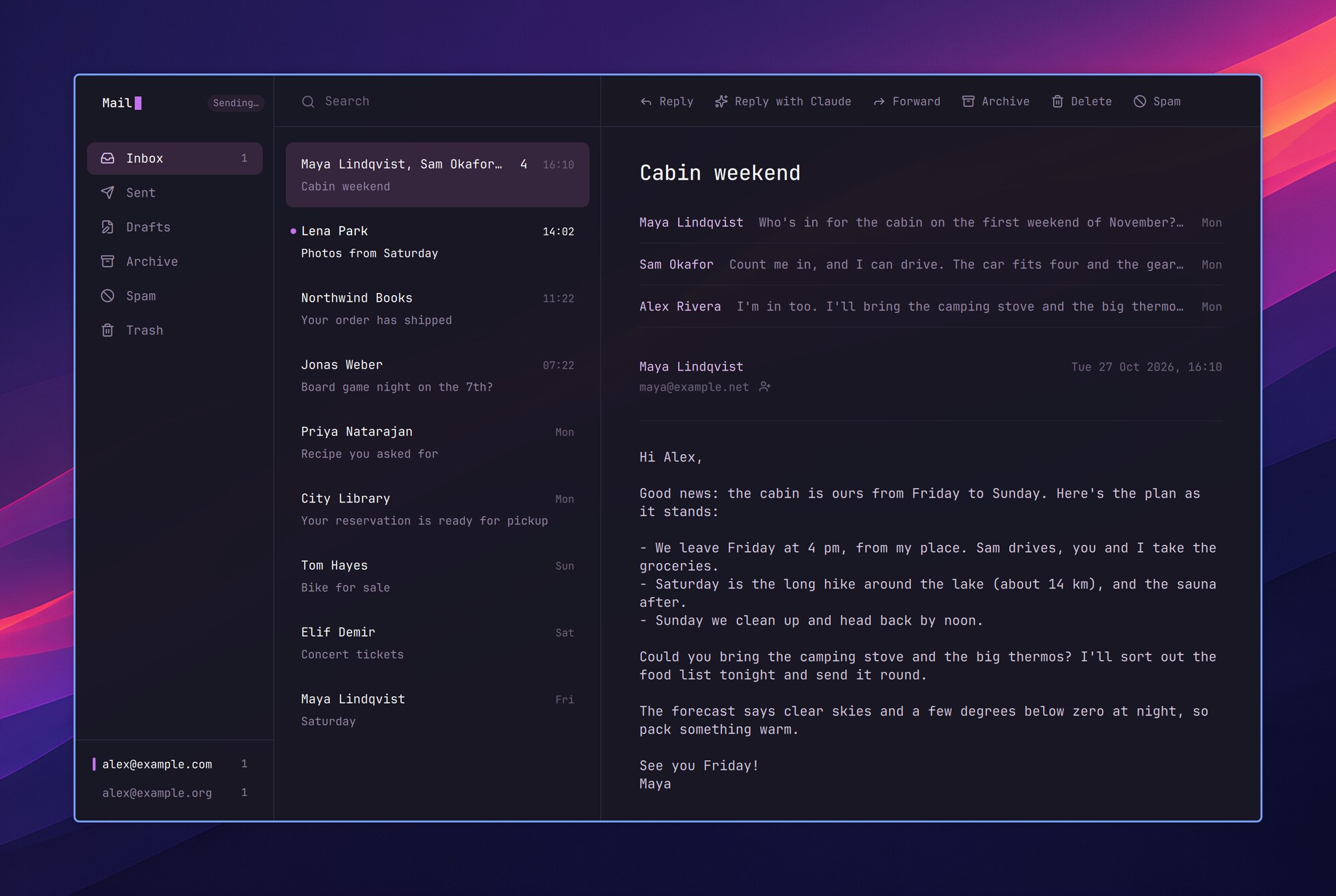
Quiet reading
Folders, the thread list and the open thread, nothing else on screen. Every action has a key: ? shows them.
Claude writes the reply
⌘⇧C writes the reply in the message's language. You read it before anything is sent.
Answer from the notification
New mail arrives within seconds, with Reply, Reply with Claude, Archive and Delete right in the notification.
On your own computer
Your mail is kept in a folder on your computer, so it opens at once and works offline. Remote images stay off.
Reading
| ? | Mail's keys. The ⌘ keys follow Mac Mail; on a PC keyboard they are Ctrl |
| ↑↓ or jk | Move in the list |
| Space⇧Space | Page through the message |
| / or ⌘F | Search (notmuch's query syntax); Esc clears it |
| 1–6 or Ctrl↑Ctrl↓ | Inbox, Sent, Drafts, Archive, Spam, Trash |
| ⌘B | Hide or show the folders |
| Tab⇧Tab | Keys to the folders and back |
| CtrlTabCtrl⇧Tab | The next account |
| Enter | The thread in a window of its own (in Drafts, the draft) |
| h | Text, HTML on the dark page, or HTML as it was sent |
| ⇧H | The HTML in your browser, with nothing loaded from the network |
| u⇧U | Mark unread; mark the whole folder (or what a search found) read |
| ad! | Archive, Trash, spam (in Spam: not spam) |
| ⌘Z | Undo |
| ⇧↑⇧↓⌘A | Select several threads (Ctrl-click adds one) |
| ⌘⇧⌫ | In Trash: empty it (d there deletes one for good) |
- The next sync makes every move on the server too, so your phone sees it.
- In a narrow window the list and the thread take turns: Enter or → opens the thread, Esc or ← goes back. Moving in the list marks nothing read.
- In a long thread, the read messages fold to one line each, and a quote that is all in an earlier message hides behind
•••. - Remote images stay off, and so does the sender's tracking. In the browser (⇧H), Load images brings them, still without scripts.
- With Nightdrive Contacts, a button beside the sender opens their card, or adds them.
Writing
| c or ⌘N | New message |
| r⇧R | Reply to all; to the sender only |
| f | Forward, with the attachments |
| CtrlEnter | Send |
| ⌘S | Save in Drafts |
| ⌘⇧A | Attach files (or drop them on the window) |
| Esc | Close: saved again if it was saved before, a new one thrown away on the second Esc |
- Sending goes on in the background. A message that can't be sent stays in Drafts, and "Not sent" in the sidebar tells why.
- A reply goes from the account the message came to; a click on From changes it. Your signature (
signatureinaccount.conf, below) goes above the quote. - To and Cc suggest addresses from your mail, and from Nightdrive Contacts.
- Picked as the email app (Launcher › Settings › Apps › Default apps), Mail opens mailto: links, and HyperE opens it.
Claude writes the reply
- ⌘⇧C on a message has Claude write the reply, in the message's language. In the writing window, select a draft of your own ("say yes, but next week") and ⌘⇧C writes it out.
- The reply shows first, with what Claude read: Enter puts it in place, ⌘⇧C writes another, Esc cancels. Nothing is sent before CtrlEnter.
- The first ⌘⇧C asks what Claude reads: the whole thread (the best replies), or only the text you select. Settings (⌘,) changes it.
- It needs Claude Code signed in. The reply is written by
claude -pwith no tools, not even your MCP servers or connectors, so a message can't steer it into using them.
Notifications
- New mail in the inbox gets a notification with Reply, Reply with Claude, Archive and Delete, also with Mail closed. More than three at once come as one.
- Inbox mail arrives within seconds (IMAP IDLE); the other folders, and a server without IDLE, sync every 5 minutes.
- Notmuch's post-new hook runs
nightmail notify. A hook of your own is left alone: addnightmail notifyto it.
Settings
⌘, (or Launcher › Settings › Apps › Mail): whether writing and message windows float or open beside Mail, how a message opens, and what Claude reads. Kept in ~/.config/nightmail/settings.json.
Setting up an account
Mail reads the mail that mbsync has fetched into ~/Mail and notmuch has indexed, and sends through your provider's SMTP server. These steps set up one account; each command can be run as it is, after putting your own values in place of the examples (you@example.com, mail.example.com, the account name example). Claude can do them with you: Mail's first start, before an account, offers Set up with Claude, which opens Claude Code in a terminal to go through them a step at a time and then offers to add more accounts (nightmail setup does the same, and so do Welcome to Nightdrive, Launcher › System › Set up Nightdrive, and asking Claude to set up Nightdrive Mail by this page). Your password goes only into the login keyring, by a command you run yourself.
- Mail comes with Nightdrive; on an install without it,
nightdrive apps install mailinstalls it: notmuch, isync (mbsync), libsecret (secret-tool) and zenity, and it says what is still missing. Many providers want an app password for mail apps (Gmail, iCloud, Fastmail): make one in the provider's account settings first.
- Put the password in the login keyring, so it is never in a file (it asks for the password):
secret-tool store --label="Mail: you@example.com" service mail.example.com user you@example.com- Tell mbsync where the mail is:
~/.config/isyncrc. The inbox goes in a folder namedINBOX, and the others keep the server's names:
IMAPAccount example
Host mail.example.com
Port 993
TLSType IMAPS
User you@example.com
PassCmd "secret-tool lookup service mail.example.com user you@example.com"

IMAPStore example-remote
Account example

MaildirStore example-local
Path ~/Mail/example/
Inbox ~/Mail/example/INBOX
SubFolders Verbatim

Channel example
Far :example-remote:
Near :example-local:
Patterns *
Create Both
Expunge Both
SyncState *- Tell notmuch where the index is:
~/.config/notmuch/default/config(write your name and address):
[database]
path=Mail
[user]
name=Your Name
primary_email=you@example.com
[new]
tags=unread;inbox;
ignore=.mbsyncstate;.uidvalidity;.mbsyncstate.journal;.mbsyncstate.new;.mbsyncstate.lock
[search]
exclude_tags=deleted;spam;
[maildir]
synchronize_flags=true- Fetch the mail and index it. The first time takes a while with a big mailbox:
mkdir -p ~/Mail/example
mbsync -a
notmuch new- Tell Mail how to send:
~/.config/nightmail/account.conf.sentanddraftsare the folders under~/Mailthat mbsync made (a copy of each sent message goes there, and the next sync uploads it).signatureis optional: its further lines are indented, and it goes under what you write.suggest-modelis optional too: the Claude model that writes replies (sonnet by default). Mail checks the server's certificate when it sends, as mbsync does when it syncs, so nothing goes out to a server whose certificate isn't valid. A server with a self-signed certificate can't be used for sending: mbsync and the inbox watch trust the one in the account'sCertificateFileinisyncrc, sending doesn't.
[account example]
name = Your Name
address = you@example.com
smtp = mail.example.com:465
user = you@example.com
password-cmd = secret-tool lookup service mail.example.com user you@example.com
sent = example/Sent
drafts = example/Drafts
signature = Your Name
Example Ltd · example.com- Run
nightmail enable(or the plugin's installer again): Mail joins the apps, the notifications get their hook, new mail in an inbox comes as it arrives, and the rest syncs every 5 minutes. What is in the inbox now isn't announced as new.
- Check it:
nightmailopens Mail with your inbox. Send yourself a message, thennightmail sync: it shows in the inbox and a notification comes.
Mail finds the folders by these names: INBOX, Sent, Drafts, Archive, Spam and Trash (Archive is made the first time you archive). Runbox and Fastmail use them as they are. Where the server's names differ, map them to Mail's in isyncrc with a channel per folder in place of Patterns *: Gmail's [Gmail]/Sent Mail, [Gmail]/Drafts, [Gmail]/Spam and [Gmail]/Trash, iCloud's Sent Messages, Junk and Deleted Messages, Outlook's Sent Items, Junk Email and Deleted Items. For example:
Channel example-sent
Far :example-remote:"[Gmail]/Sent Mail"
Near :example-local:Sent
Create Near
Expunge Both
SyncState *
More accounts
Each account gets its own folder under ~/Mail and its own section in account.conf: repeat steps 2, 3 and 6 with another name in place of example ([account work], ~/Mail/work/, sent = work/Sent), then mbsync -a and notmuch new. Mail finds an account's mail by its folder (the one sent is in, or maildir = …), shows the first account in the file when it opens, and remembers the one you looked at last. In notmuch's config, primary_email is one of your addresses and other_email lists the rest (other_email=work@example.com), so replies to all leave every one of them out.
A Gmail or Google Workspace account (with an app password, if the Workspace allows them) is imap.gmail.com and smtp.gmail.com:465, with a channel per folder in place of Patterns *: INBOX, and [Gmail]/Sent Mail, [Gmail]/Drafts, [Gmail]/Spam and [Gmail]/Trash as Sent, Drafts, Spam and Trash. The names follow the language of the Gmail account ([Gmail]/Lähetetyt viestit, [Gmail]/Roskakori …): mbsync -l CHANNEL shows them. Archive is [Gmail]/All Mail, which holds every message, so a message deleted there is gone for good. Its channel only brings mail down and sends read marks up, and all-mail = yes in the account's section of account.conf tells Mail to copy messages out of it and never move them. Archiving is then leaving the inbox, as in Gmail:
Channel example-archive
Far ":example-remote:[Gmail]/All Mail"
Near :example-local:Archive
Create Near
Sync Pull PushFlags
Expunge Near
SyncState *
In a terminal
| Command | What it does |
|---|---|
nightmail | Opens Mail, or brings it forward |
nightmail new | Writes a new message |
nightmail setup | Sets up an email account with Claude, in a terminal |
nightmail settings | Opens Mail's settings |
nightmail sync | Fetches new mail now and shows it |
nightmail show ID, reply ID, claude ID, archive ID, delete ID | A message by its notmuch id, as the notifications use them |
nightmail enable, disable | Mail among the apps, its notifications and the sync, on or off (your mail and settings stay). Run enable again after changing isyncrc. |
nightmail restart, quit, log | After a change to Mail, and its QML errors |